Configure OBI
Learn how to configure OBI.
You are viewing the English version of this page because it has not yet been fully translated. Interested in helping out? See Contributing.
OpenTelemetry libraries provide telemetry collection for popular programming languages and frameworks. However, getting started with distributed tracing can be complex. In some compiled languages like Go or Rust, you must manually add tracepoints to the code.
OpenTelemetry eBPF Instrumentation (OBI) is an auto-instrumentation tool to easily get started with Application Observability. OBI uses eBPF to automatically inspect application executables and the OS networking layer, and capture trace spans, Rate Errors Duration (RED) metrics, runtime metrics, and application and network relationships for supported Linux workloads. All data capture occurs without any modifications to application code or configuration.
OBI offers the following features:
OBI v0.15.2 supersedes the unpublished v0.15.0 and v0.15.1 releases. It includes the intended v0.15.0 changes, a BPF verifier correction, and a release artifact build correction. Install v0.15.2 when upgrading from v0.14.0.
target.info counts, and fixes OTLP/HTTP JSON trace encodingReview the v0.15.2 upgrade notes and release notes for changes that affect dashboards, metric cardinality, and trace processing.
If you want to explore the upstream examples, see the NGINX walkthrough and the Apache walkthrough.
go.opentelemetry.io/obi/collector
module at v0.15.2. The root module no longer contains the receiver package.
See Collector receiver setup for the updated
module replacements and component versions. Go embedders must also replace the
removed PrometheusConfig.Registry field with a Prometheus HTTP port
configuration.enabled.metrics: false now also suppresses that
protocol’s span metrics and service graphs. Traces remain independently
configurable. Review the migration report when Config v1 instrumentation lists
and derived metric coverage differ. See
metric feature selection.server.address values omit the Host header’s port; server.port
and url.full retain it. Kubernetes Service hosts with ports now resolve to
the service and namespace, which can change service graph names.rpc.method values omit the leading slash. Invalid or
unread paths use span name grpc and method _OTHER; rpc.method_original
preserves a captured raw path. ONC RPC uses {program}/{procedure} methods
only when a CALL was captured and reports response status only with a REPLY.message becomes chat, GraphQL
server names omit GraphQL, and S3/SQS names use S3./SQS. prefixes.
Update span-name filters and span-metric queries.db.collection.name by default. RPC client
duration adds server.port, and failed RPC server duration adds error.type.
Messaging client duration adds messaging.operation.type; client and process
durations include subscription names when present. These defaults can split
metric series. See metric attributes.messaging.destination.subscription.name
instead of destination name and omits the filter from span names. Shared
subscriptions also report messaging.consumer.group.name. AWS SNS spans no
longer include rpc.system.name or rpc.method.0.15.2, retaining earlier transformations.
The telemetry registry uses Weaver definition/2; span reference IDs no
longer have a span. prefix, so update links to old catalog anchors.When upgrading from a release older than v0.14.0, also review the earlier changes below. The release notes describe additional protocol-specific naming and attribute changes.
error.type by default on
failed requests. Their Prometheus series gain an error_type label, with an
empty value on successful requests. Review dashboards and alert queries that
depend on the old series.host.id to each data point. The value
remains a resource attribute and in target_info; OBI’s Prometheus exporter
is unchanged. Consumers that flatten OTLP resources into Prometheus labels
should check their host_id queries.service.peer.name, http.request.body.size, http.response.body.size, and
obi.http.response.observed are now opt-in span attributes. Select them with
attributes.select.traces.include
when needed; service graph processors may need service.peer.name.traces_ctx_v1 map is no longer populated by default. External
trace-profile correlation and the Go channel handoff fallback can be restored
with
ebpf.populate_trace_context: true.OTEL_RESOURCE_ATTRIBUTES, with values merged per key.db.namespace from X-Found-Handling-Cluster. Existing metric series may
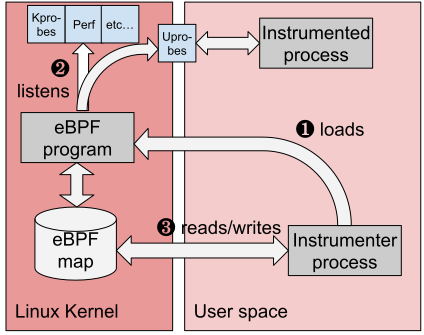
split by cluster. AWS SQS spans no longer include aws.extended_request_id.The following diagram shows the high-level OBI architecture and where eBPF instrumentation fits into the telemetry pipeline.
OBI supports Linux environments that meet the following requirements:
| Requirement | Supported |
|---|---|
| CPU architecture | amd64, arm64 |
| Linux kernel | 5.8+, or RHEL-family Linux 4.18+ with the required eBPF backports |
| Kernel features | BTF |
| Privileges | Root, or the Linux capabilities required by the enabled OBI features |
OBI publishes the following supported release artifacts:
| Artifact | Supported platforms |
|---|---|
obi binary archive | Linux amd64, Linux arm64 |
otel/ebpf-instrument container image | Linux amd64, Linux arm64 |
otel/opentelemetry-ebpf-k8s-cache container image | Linux amd64, Linux arm64 |
OBI can be deployed on standalone Linux hosts, in containers, and on Kubernetes when the environment meets the requirements above.
OBI does not support non-Linux operating systems, Linux architectures other than
amd64 and arm64, Linux environments without BTF, or kernel versions earlier
than Linux 5.8 outside the documented RHEL-family 4.18+ exception.
Feature-specific support details are documented in these guides:
OBI provides application and protocol observability without code changes, but it does not replace language-level instrumentation in every scenario. Use language agents or manual instrumentation when you need custom spans, application-specific attributes, business events, or other in-process telemetry that eBPF-based instrumentation cannot derive automatically.
OBI can automatically capture network and protocol activity, but it cannot always recover application-specific details that are not visible from eBPF observation points.
Some features also have additional caveats or narrower support than the core platform requirements. For details, refer to the feature-specific documentation for distributed traces and exported instrumentation.
For a comprehensive list of capabilities required by OBI, refer to Security, permissions and capabilities.
Learn how to configure OBI.
Configuring OBI to observe point-to-point network metrics.
Learn how to set up and run OBI.
Learn about the application, runtime, and network metrics OBI can export.
Learn about OBI’s distributed traces support.
How to measure total request times from the point of view of the client
Privileges and capabilities required by OBI
Troubleshooting OBI common issues and errors
Compatibility notes when running OBI alongside Cilium
Learn how OBI associates outgoing requests with incoming parent requests for distributed traces.
Overview of how to calculate the cardinality of metrics produced by a default OBI installation, considering the size and complexity of the instrumented environment.
Learn how OBI correlates application logs with distributed traces for faster debugging and troubleshooting.
이 페이지가 도움이 되었나요?
Thank you. Your feedback is appreciated!
Please let us know how we can improve this page. Your feedback is appreciated!